Import Contacts from MS Excel
Company and Contact details can be imported from an MS Excel worksheet. The import MS Excel sheet needs to be downloaded, completed, saved then imported.
To import Contact List from MS Excel:
-
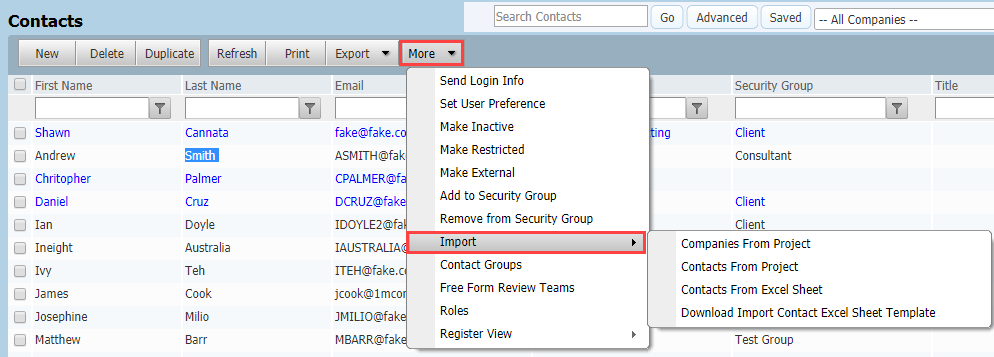
Click Contacts, from More go to Import, Download Import Contact Excel Sheet Template.
-
Open the Excel template and save it to your computer.
-
Populate the excel template with the details of the contacts. Key fields (highlighted in red) are as follows:
- Company ID, Company, Company Type, Company Type Title
- Contact ID, First Name, Last Name
- Email, Address Line 1
-
Once finished, click Contacts, from More go to Import, Import Contacts from Excel Sheet.
-
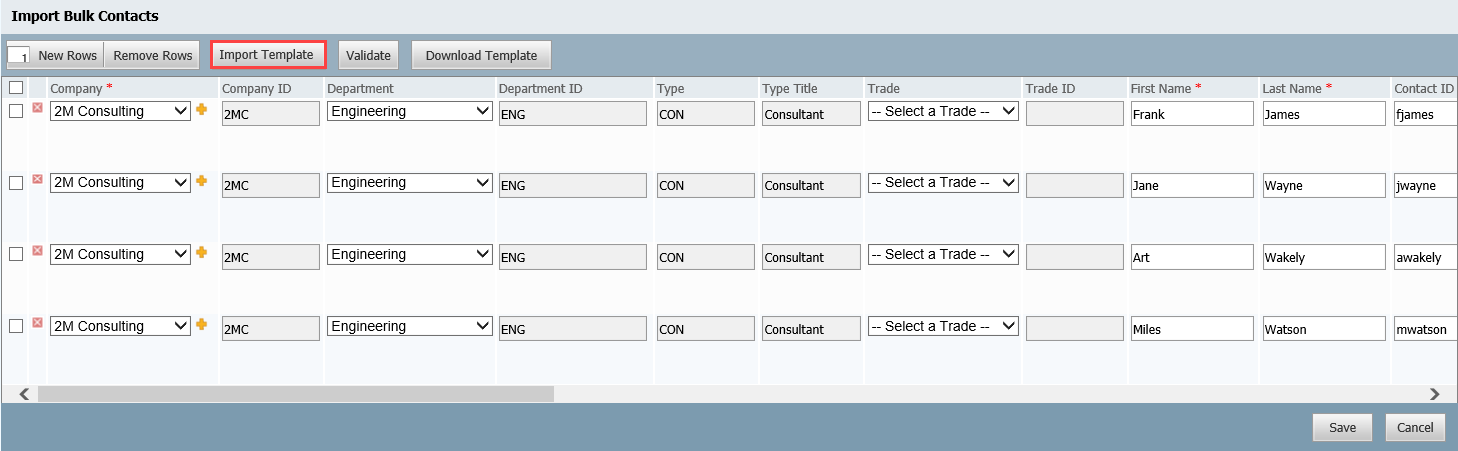
At the Import Bulk Contacts window choose Import Template, select the Import file populated.
-
The rows on the Import Bulk Contacts window will populate automatically based on the information in the import file.
-
Click Validate and scroll to the right hand side of the window to view any errors.
-
Fix any errors and click Save when done.
-
Click OK when prompted and Cancel to return to the address book.
-
If new companies and/or departments are found in the Import file, these will automatically be added to the InEight Document Companies and Departments lists.
-
It is also possible to import just a list of Companies without contact details using the process above.
-
When importing a contact list from MS Excel into the InEight Document Address book, you can mark one or more contacts as External Contacts.