Document Attribute Extraction
In addition to Auto Document Number there is the ability to extract Document Metadata information from the saved file name. This will be active for both single and bulk document uploads.
The option to ‘Extract Document metadata from file name’ needs to be activated via Project Settings - Documents.
To define the Document File Name Format:
-
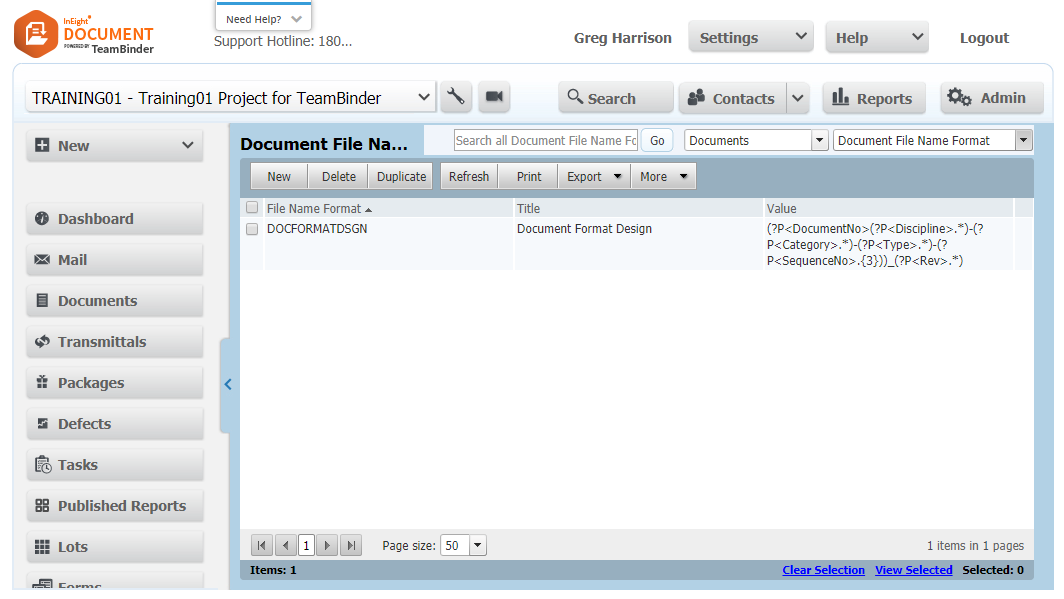
From the Configuration tables select Document File Name Format
-
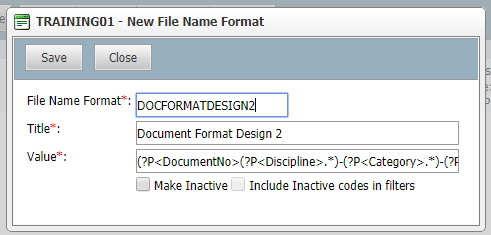
Click New and add a File Name Format and Title.
-
The Value field must be populated with the required expression to extract the metadata, and then click Save.
-
When a file is added to a single upload or bulk upload and meets that about file format the metadata will be extracted.
-
Fields are extracted using RegEx – please see examples at https://www.regextester.com
-
Field names need to be inserted with the format (?P<fieldname>.*)
-
No spaces if field name is two separate words.
-
To include other attributes as part of document number use the format (?P<documentno>(?P<fieldname>.*)-(?P<fieldname>.*))
-
The two fields included before the )) would make up the document number.
-
Documentno does not have the closed parenthesis at the end to indicate the inclusion of the fields following.
-
Note that the “-“ between parentheses is the separator between attributes.
-
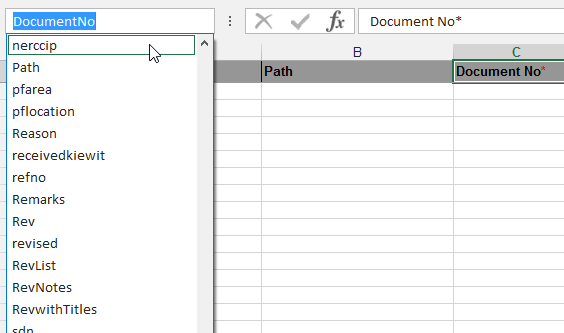
To find names of custom fields use XL-upload as below:
-
Highlight any field name header.
-
Select drop down in top left.
-
Locate field name for utilizing in document number convention.