Customizing Register Views
A custom register view for each module can be defined by default for all users within a project. Alternatively, each company can define their own default custom register viewers for each main register.
To define a Company level or Project Level custom views:
-
Define a user based custom view that you want to deploy as a company or project level view.
-
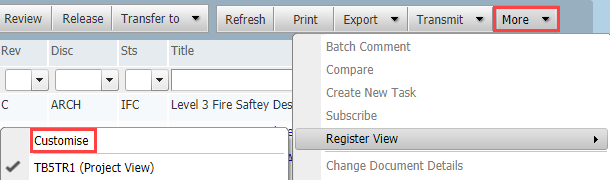
From the relevant register select Register View from More and Customize.
-
At the Customize Register window select the required personal custom view from the drop down list. From Set View as select either Project View or Company view.
-
Your company or project view will now be listed as custom views within the naming conventions:
- <Project Number> (Project View) for Project views
- <Company Name> - Company View for Company views
-
When users access a register their preferred (default) custom view will be loaded. If they do not have their own custom view the company defined custom view will be loaded, otherwise a Project defined custom view will be loaded. If no custom registers are defined a system default view will be displayed.
-
The ability to define Project and User level Custom register views is enabled by default and managed via the Project settings. If enabled at a Project level the option to allow a user custom register views can be managed at a company level from the Options tab within company details.