Document # Masks
If a fixed document numbering format is to be used on a project, it is possible to define this format within InEight Document to ensure the format is adhered to for all documents uploaded to the project. Multiple fixed formats masks are also supported.
To define Document # Masks:
-
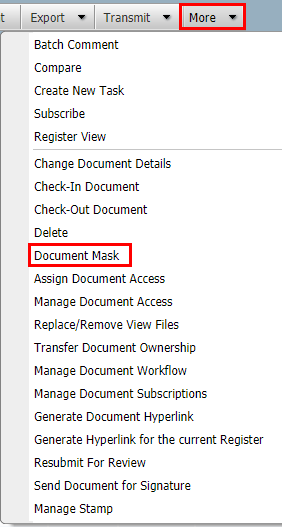
From the Document Register, go to More, then Document Masks.
-
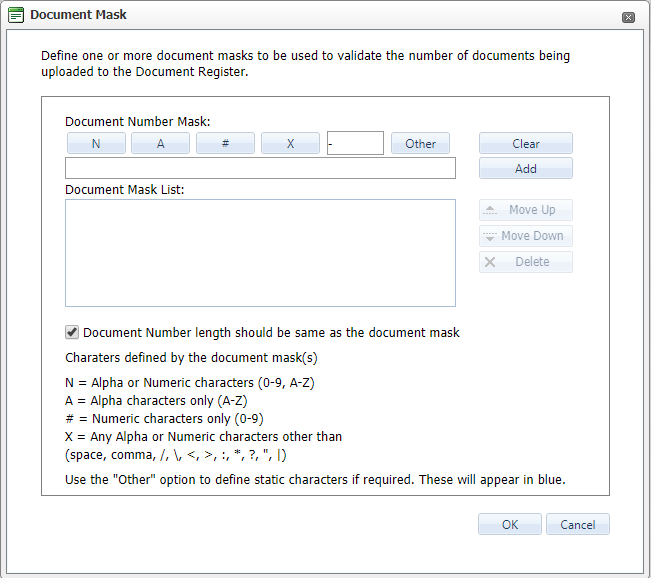
Enter the required document number mask by clicking on the Document Mask buttons.
-
The mask can consist of any combination of the following:
-
N = Alpha or Numeric characters (0-9, A-Z)
-
A = Alpha characters only (A-Z)
-
# = Numeric characters only (0-9)
-
X = Any Alpha or Numeric characters
-
- = Use the hyphen as a separator where required.
-
Click the Add button.
-
Click OK.
-
To control the length of document numbers. Tick the box labelled Document Number length should be the same as the document mask.
-
To define fixed characters as part of the document number (for example to have the project number as the first 4 characters of all documents) using the Other button.
-
A series of alternative masks can be used on a project. Documents uploaded must conform to one of the masks in use.
-
Use the arrow buttons on the right of the screen to move a Document mask up or down, this determines the order of preference of the document masks.
-
Click the Remove button to remove a mask from the system.
-
When users are entering new documents into to the system, they will see the document mask icon in the document entry screen. They can use this icon to see the document mask(s) in use on the project.