Processing Subscription Requests
A Subscription Request is a request by an InEight Document user for access to a document or document format to which they do not currently have access.
Subscription requests are processed by either the Project Administrator or Company Administrator.
To process subscription requests:
-
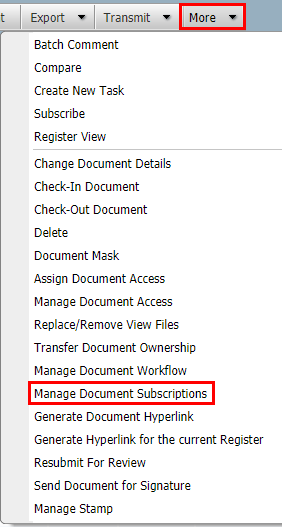
From within the Document Register, select Manage Document Subscriptions from the More button group of options.
-
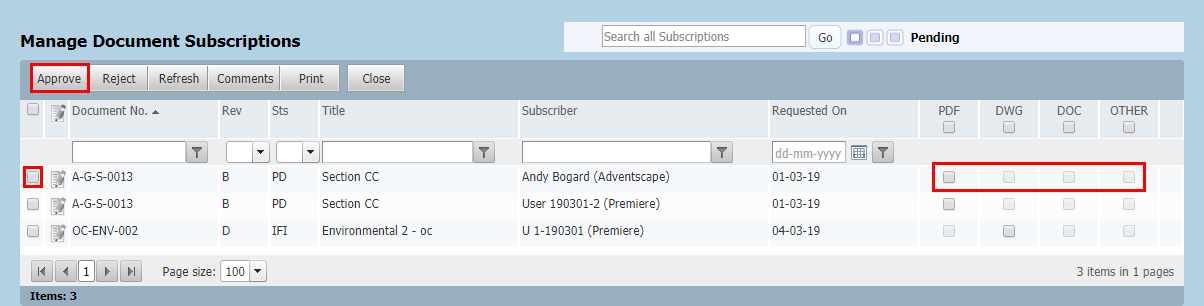
The latest subscription requests pending your action are listed.
To approve document subscriptions:
-
Select one or more subscription requests by ticking the boxes next to the document numbers (note that each request is by a user for a particular document).
-
Tick the file formats against each document that the user will be able to access/download.
-
Click the Approve button on the toolbar.
-
To reject a document subscription request, simply click the Reject button.
-
An email is sent to the user requesting the access notifying them of your decision.
-
Click the Comments button to enter a message regarding your decision. To include the message with the email sent to the user advising them of your decision, tick the Add this comment(s) to the notification box.
-
To see previously approved subscription requests, click the View Approved Subscriptions option group button at the top right of the screen.
-
To see previously rejected subscription requests, click the View Rejected Subscriptions option at the top right of the screen.
-
The option to allow users who get access to a document via subscription to automatically get access to future revisions can be removed from the system completely if required. Contact InEight for details.