Making contacts inactive
You can make contacts inactive when they are no longer on the project. The user remains in the address book, but they are removed from listed document distribution rules and any assigned security groups.
Considerations: If a contact is a project administrator or a review coordinator, they must either be removed from those positions before starting these steps, or you can force inactivation. See Force inactivation for more information.
Make contacts inactive
-
From the Address book, select the contacts, expand the Actions menu, and then select Make inactive.
-
Click to confirm your selection. To include inactive contacts in filters, select the Include inactive contacts in filters check box.
It is suggested to include inactive contacts in filters to ensure searching for key activities for that user can be done. You can also force inactivation. Use this option when the user is associated with key roles within the system but needed to be inactivated prior to inactivation. Removal from these areas is still required to ensure that key project processes can take place.
When inactivating contacts, an option will be provided to remove the user from active areas within the system
-
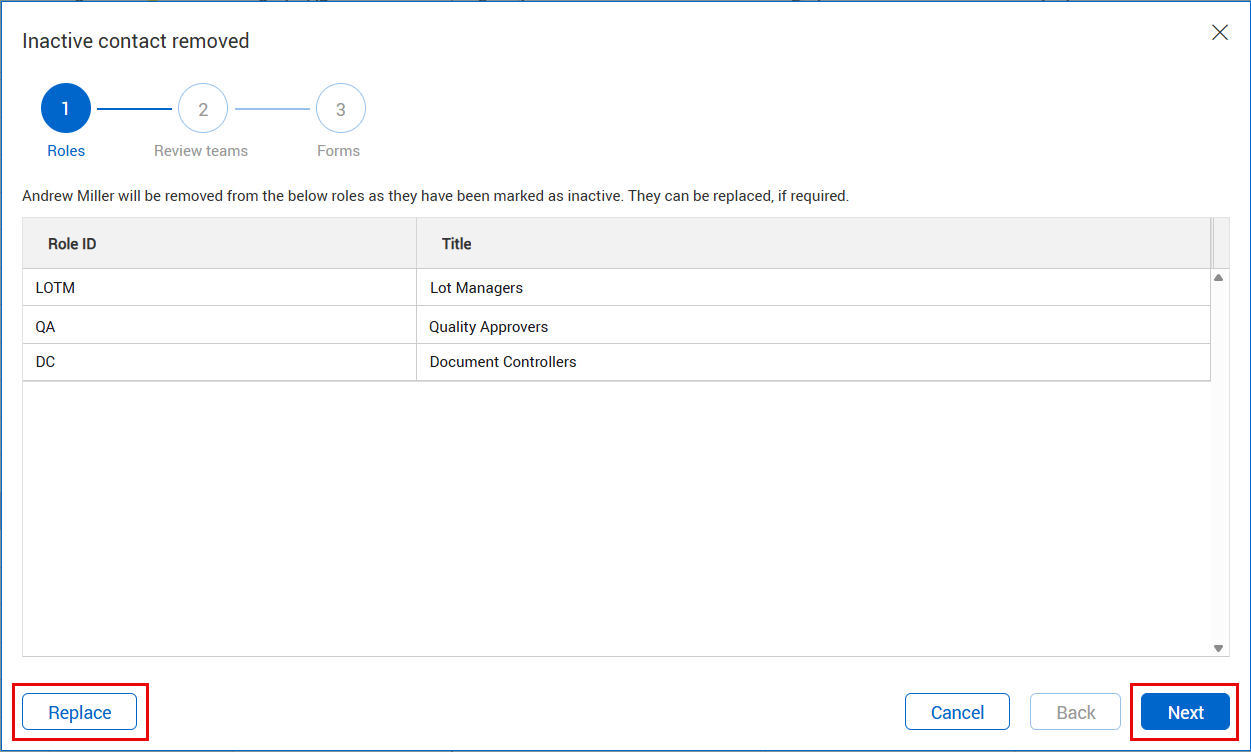
Review any roles from which the contacts will be removed. Replace them as needed by clicking Replace. Click Next.
-
Review any review teams affected and make replacements for the contact by selecting Replace if needed. Click Next.
-
Review any forms that the contacts will be removed from and replace them by clicking Replace, if needed. Click Finish to complete the process.
-
If a contact cannot be removed, their name shows in the dialog box along with the reason. Click Ok.
Review the listed reasons why the contact was not made inactive, resolve the identified issues, and then repeat the process to make the contact inactive.
Force inactivation
If a contact cannot be set to inactive because they are a project administrator or a document review coordinator, you can force inactivation. The contact remains in place on key processes until they have been replaced or removed, which is necessary to complete the process.
To force inactivation, select the Force user inactivation check box, and then click Okay.