Participate in a Checklist
You can fill in a checklist that is assigned to you. You receive a notification when a checklist is assigned to you. You can also find your assigned checklists on the Checklist register.
Participate in a checklist
Summary: Fill in a checklist as you complete assigned tasks.
Considerations: These steps start with finding your check list in the Checklist register. If you open your assigned checklist from the notification, start with Step 2.
-
From the Checklist register, click the Checklist ID of checklist you want to open.
-
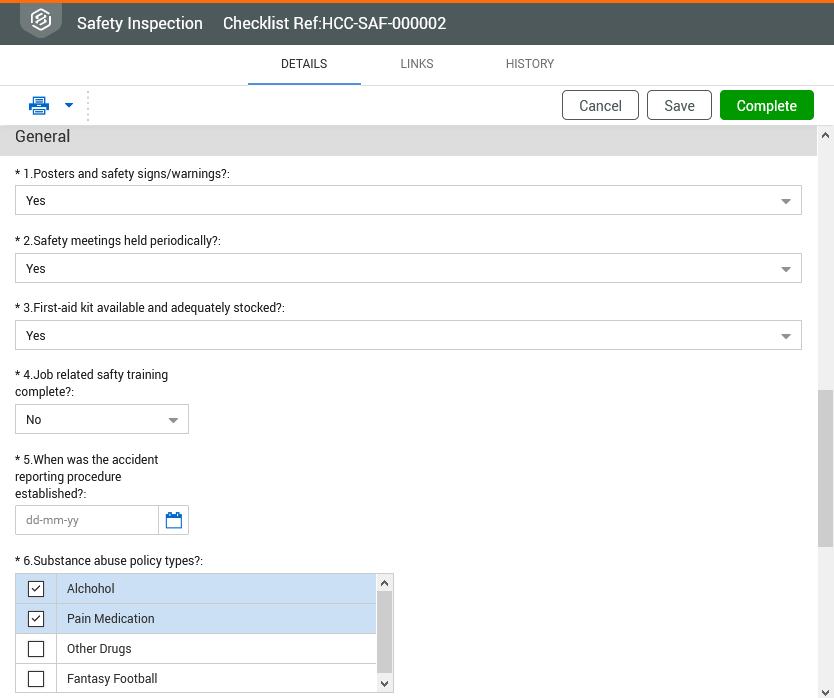
Complete the items as required in each section. The items may have different associated response types such as free text, check box, dates etc.
-
Click Complete to notify the system that you have completed the relevant sections and move the checklist onto the verifier. When there is only one user or role specified as the verifier, the Verification section defaults to that user. You can change the verifier if applicable.
Click Save to save progress on the checklist. It can then be edited at a later time as required.