View Review Status
You can view the status of a document that is in a workflow process. To view the status in a workflow, you must be the Document Originator, Review Coordinator, or the Primary and Additional Project Administrator.
View the review status of a document
-
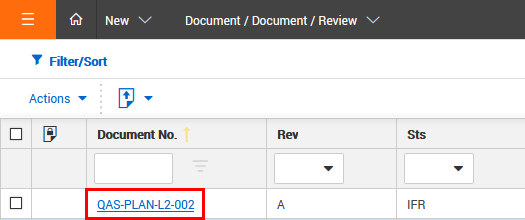
Open the Document or Review Register.
-
Click the Document Number link to open the details page.
-
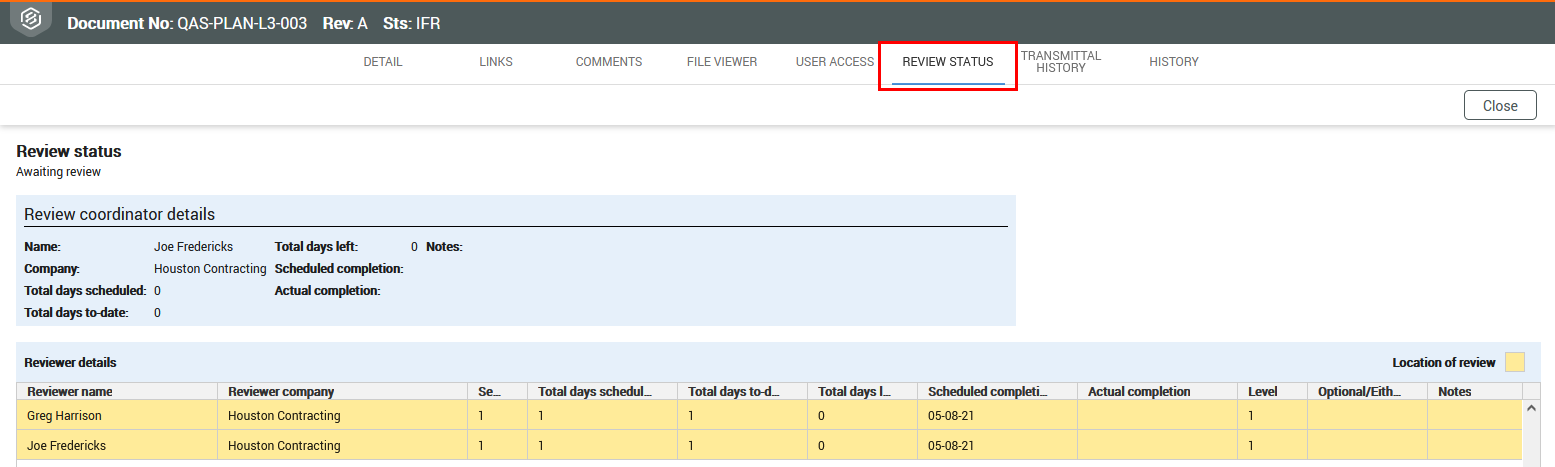
Select the Review Status Tab.
The review status tab shows:
-
The type of review that is in progress (Serial, Parallel or Single)
-
The person currently responsible for the review and their scheduled completion date.
-
A list of reviewers for the document and for each reviewer:
-
Sequence: the sequence the reviewer reviewed the document.
-
Total Days Scheduled: scheduled days for the reviewer, not the total review period for the document.
-
Total Days to Date: either the actual days to date since the reviewer was notified to commence their review (for incomplete reviews), or the actual days taken for the review (for completed reviews).
-
Total Days Left: for completed reviews = 0, and for reviews in progress = the scheduled completion date less the system date in days.
-
Scheduled Completion: calculated based on the date the reviewer was notified to start their review plus the scheduled duration. This date is empty for reviewers who have not yet been notified about the review.
-
Actual Completion: date of review completion.
-
Optional/Either: if the review is classified as optional or either for the reviewer.