Forms register
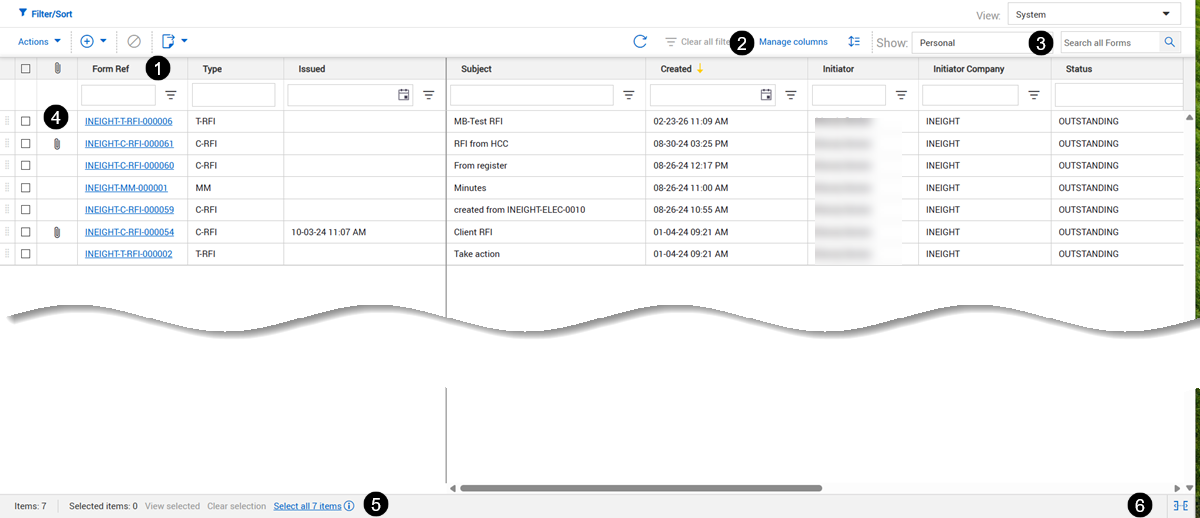
The Forms register contains all forms related to a project. The register lets you see information including the form reference number and type, subject, initiator and status.
The form register has the following features:
| Item |
Description |
| 1 |
You can sort and filter the Forms register column headers to sort by columns or use the column filters to quickly find the forms you need. |
| 2 |
Click Manage columns to customize the columns shown in the register view. |
| 3 |
Use the Search feature to find a specific form. |
| 4 |
Click the Attachments icon next to a form to download form attachments. |
| 5 |
Manage selected forms. You can quickly see the number of items selected, view selected items, clear your selection, or select all items. |
| 6 |
Switch between pagination and virtual scroll. |