Managing Sublots
Sublots are typically used to break larger lots further into smaller segments. For example, a bridge that is a lot might be broken into smaller sublots such as piers, abutments, decks, and girders.
There is no limit to the number of Sub Lots that can be created under a Parent Lot.
Create a sublot
Summary: Add a sublot to a lot to break the lot into smaller segments.
-
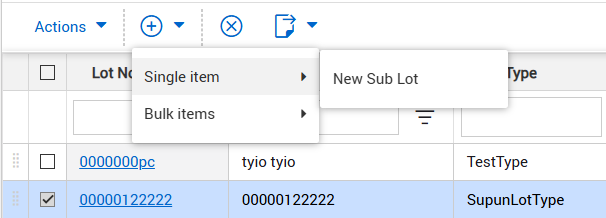
From the Lots register, select the parent lot, click the Add icon, and then select Single item > New Sub Lot.
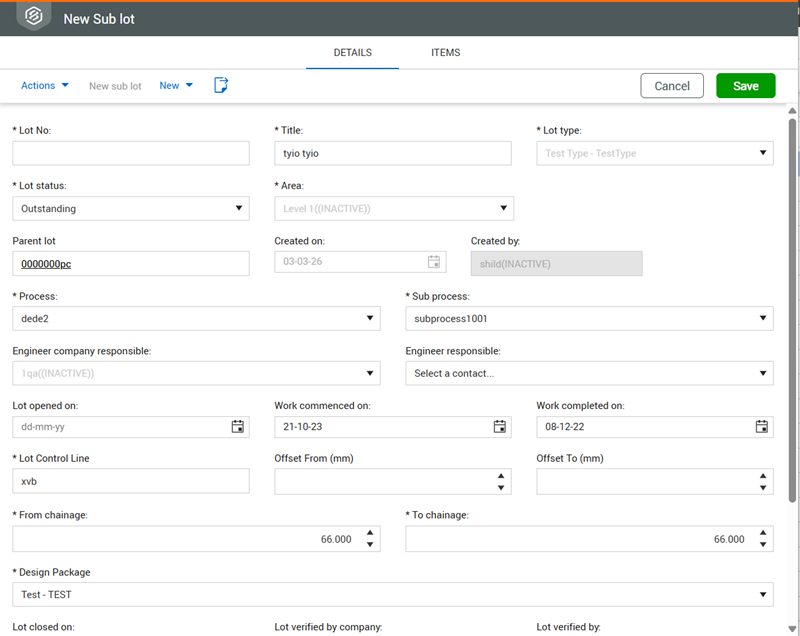
The parent lot number shows in the Parent lot field.
-
Complete the new subot details, and then click the Save button.
What's next: The new sublot shows on the Sublots tab of the parent lot.