Download documents
You can download documents from a submittal to your workstation for reviewing offline. You can download documents individually or in bulk.
Download a single document
Summary: Download a single document when you have only one document and you want to view it before downloading.
-
From your submittal's Deliverables page, click the value in the Documents column to show a list of documents.
-
Open a document from the list, and view as needed.
-
Go to the Details page of the document.
-
Select the document, and then click the Download icon.
Download documents in bulk
Summary: You can download documents in bulk, so you can take advantage of spreadsheet features to enter document information quickly and efficiently.
-
From your submittals Deliverables page, click the value in the documents column to show a list of documents.
-
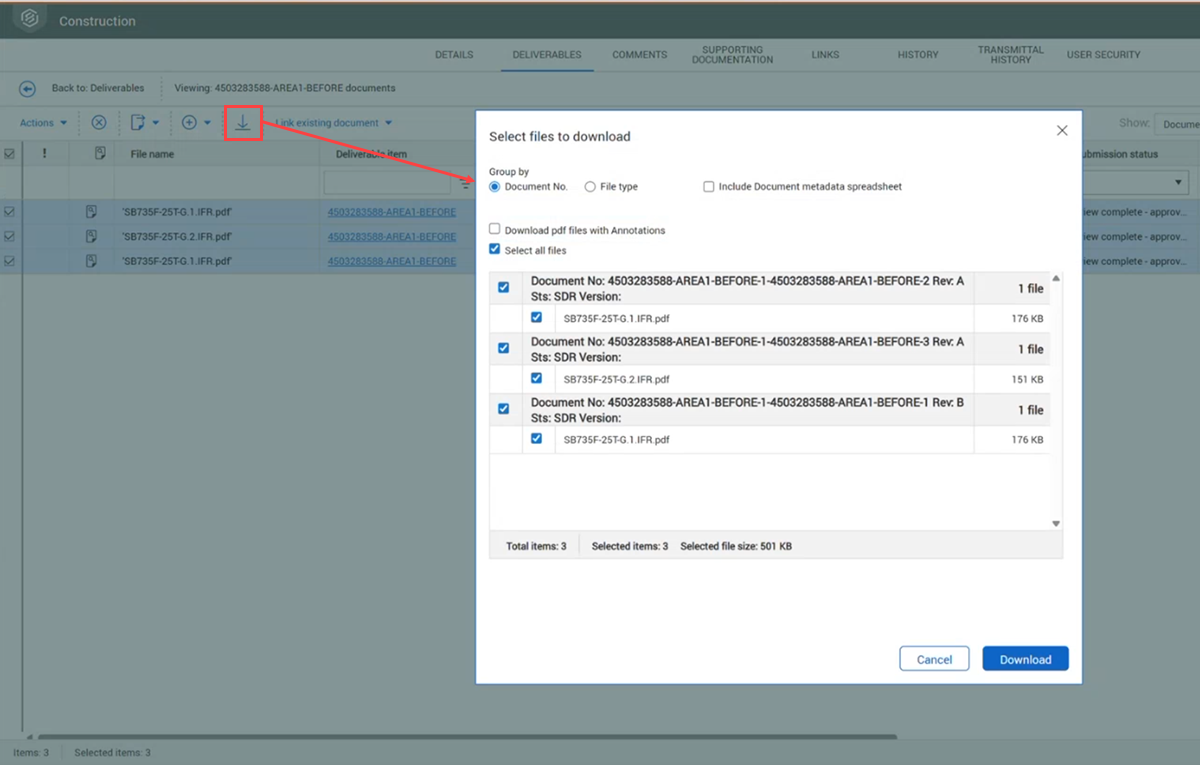
Select the documents you want to download, and then click the Download icon.
-
Select whether to group documents by number or file type.
-
If you want to include the metadata spreadsheet that is automatically generated, select the Include Document metadata spreadsheet check box.
-
If you want to download files with annotations, select the Download pdf files with Annotations check box.
-
Select the files you want to download, and then click Download.