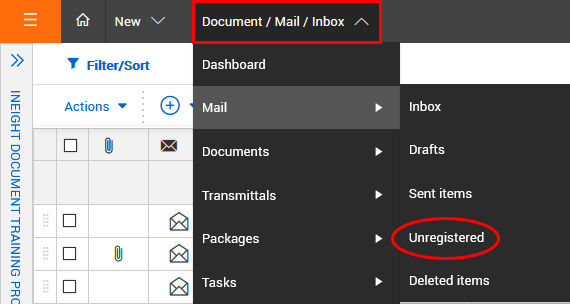
Click the Module drop-down menu.
In the Mail menu, select Unregistered.
Open the mail and click From.
Select the contact and click the arrow icon to add them.
Enter the mail details.
Click Send.
Unregistered mail is generated outside InEight Document either as a reply from an external contact or using an InEight email-in address. As it is generated outside of InEight DOC it will be missing certain InEight fields including mail type. Any missing fields that are mandatory need to be assigned before the mail can be processed into recipient inboxes.
Usually unregistered mail is delivered back to an administrator from an unregistered company or department. However, if the unregistered mail is a response to InEight Mail it may return directly to the originator’s personal unregistered mailbox if this access option is available.
For unregistered mail processed at either a company or department level, the intended recipients are notified about the new incoming mail. The new mail appears in their inbox in the same way as it would as if the sender had sent the mail via InEight Document.
Click the Module drop-down menu.
In the Mail menu, select Unregistered.
Open the mail and click From.
Select the contact and click the arrow icon to add them.
Enter the mail details.
Click Send.
 Related Topics