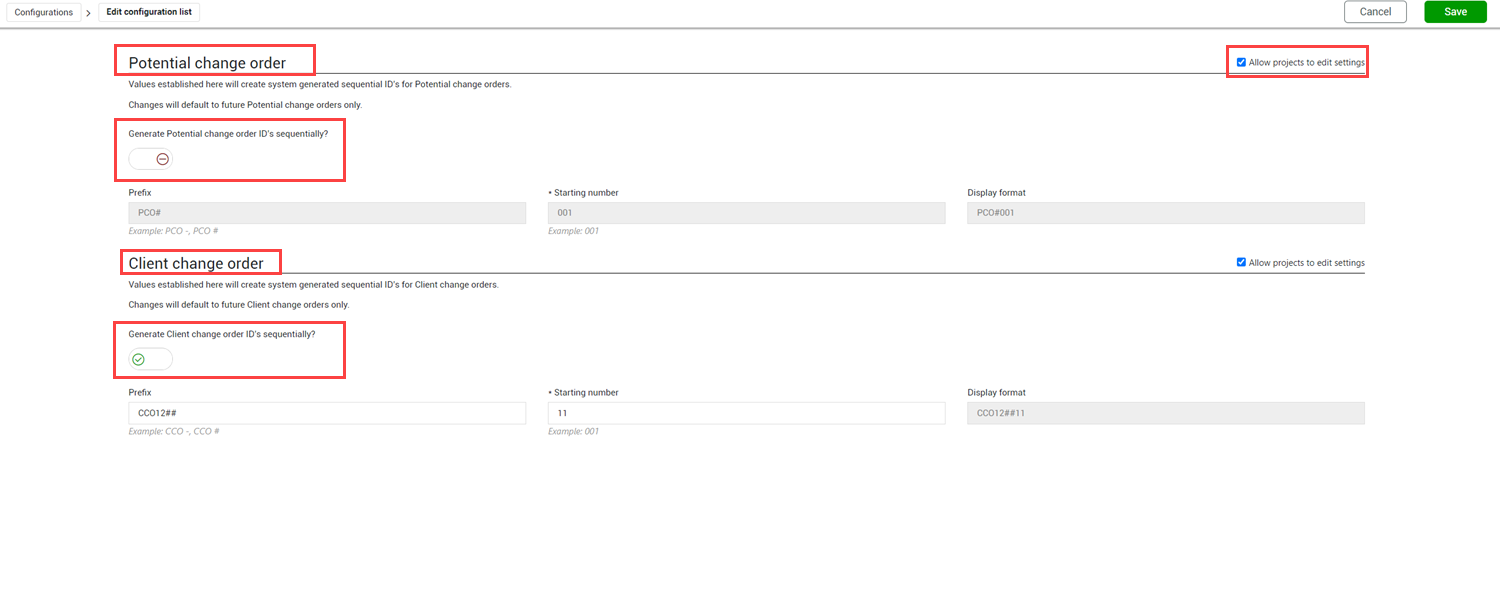
ID customization
Change lets you customize your PCO and CCO numbering schemes to ensure consistent numbering. Configuration settings at the organization and project levels let you specify whether to generate PCO and CCO IDs sequentially, and if so, a prefix and starting number.
You can configure customized IDs using the ID customization configuration list (Organization >Settings > Configurations > ID customization). You can set up numbering for PCOs and CCOs separately.
The Generate PCO/CCO IDs sequentially settings indicate whether Change generates numbers sequentially. When set to No, you enter any number as the ID when you create the PCO or CCO. When set to Yes, you can specify a prefix and a starting number that Change uses when it automatically generates the PCO or CCO ID.
The Prefix and Starting number fields are enabled only when the Generate Potential change order/Client change order IDs sequentially toggle is set to Yes. The prefix on the PCO or CCO is added to the ID in the exact way it is entered in the field. If you want a space between the prefix and the starting number, you must enter it in Prefix field. You can edit the starting number until a PCO or CCO has been created. After that, the field is disabled.
The Allow projects to edit settings check box specifies whether you can override the settings at the project level. When checked, the organization-level settings are the default at the project level, but the project administrator has the ability to override the settings. When the check box is checked, the numbering scheme is enforced at the project level. After you establish a starting number, and the first PCO or CCO is created, you cannot change the starting number at the project level.