|
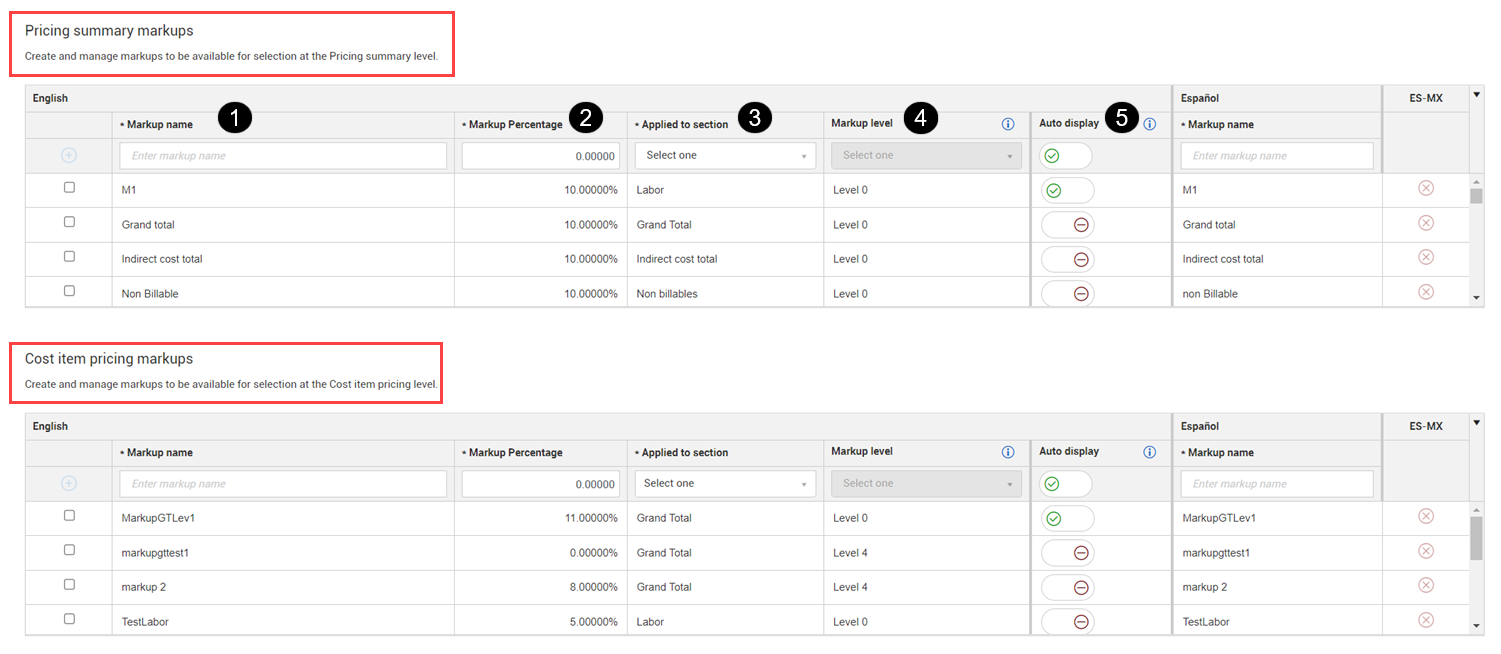
2
|
Markup percentage
|
Amount added to the cost price of goods or services to cover overhead and profit.Percentages can have up to three digits before the decimal and can be a positive or negative value.
|
|
3
|
Applied to section
|
The section that the markup applies to, which includes Labor, Equipment, Materials, Small tools & supplies, Self-perform subtotal, Vendor Subtotal, Time related overhead, and Grand total.
|
|
4
|
Markup level |
Markup calculation levels can be added to the Grand total in cost item pricing or to the Grand subtotal in the pricing summary. Levels 0-4 are available. Markups to other sections are automatically added at level 0. See Markup calculation levels for more information. |
|
5
|
Auto Display
|
If set to Yes, the markup populates automatically under the Pricing summary column. If set to No, you have the option to bring in the markup, but the markup does not show automatically.
|