General ledger accounts
General ledger accounts master data is used by the InEight Contract application.
The general ledger is the main accounting record for your organization, consisting of a collection of account categories used for tracking and reporting on the financial transactions across the entire company. The main categories typically include assets, liabilities, revenue, expenses and equity, which are then broken down into subcategories.
Considerations
With the applicable permissions, you can select the icon to add, edit, or delete master data general ledger accounts. Permissions are configured in Roles and permissions > Master data libraries > General ledger accounts.
| Permission Name |
Description |
Level |
| View general ledger accounts |
Allows the user to view general ledger accounts master data. |
Base user |
| Add general ledger accounts |
Allows the user to create and add general ledger accounts to master data. |
Account Admin |
| Edit general ledger accounts |
Allows the user to modify existing general ledger accounts in master data.
|
Account Admin |
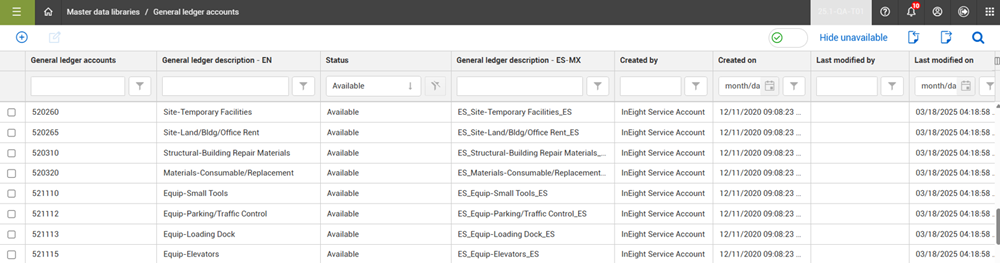
Within InEight Platform, you can store the list of accounts used for the general ledger of your organization on the General ledger accounts master data page.
| Field |
Description |
| General ledger accounts |
The unique name or number that identifies the general ledger account. |
| General ledger description |
Brief description to further identify the account. |
| Status |
Set the status to Available to allow the account to be used. If the status is set to Unavailable and the Hide unavailable toggle is set to On, the account does not show in the list. |
Manage General Ledger Accounts
You can add and edit general ledger accounts by clicking the Add and Edit icons. From the right toolbar, the Import and Export icons allow you to add and export your general ledger accounts in bulk.
By default, the Hide unavailable toggle is set to On, which filters the list to show only the available accounts that can be assigned. General ledger accounts cannot be deleted but the status of a general ledger account can be set to Unavailable, which prevents the account from being used and assigned. However, if a general ledger account is already assigned to a project, then it will still be available in the project.
Use General Ledger Accounts
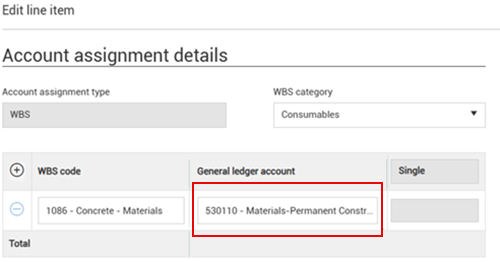
General ledger accounts can be assigned to contract line items within InEight Contract to capture their costs and send them by general ledger account category to your accounting (ERP) system via integration.
In the example, a contract line item for concrete material is assigned to a Concrete WBS code for tracking costs in InEight Control but is also assigned to a general ledger account to track these material costs for the general ledger in your accounting system.