Incoterms
Incoterms master data is used by the InEight Contract application.
Incoterms (International Commercial Terms) are a set of terms established globally to clearly define who is responsible for what when trading goods, from when the goods leave the seller to when they arrive at the buyer’s final destination. Examples of incoterms include: EXW (Ex Works), FCA (Free Carrier), CPT (Carriage Paid To), CIP (Carriage and Insurance Paid To), DAP (Delivered at Place), DPU (Delivered at Place Unloaded), and DDP (Delivered Duty Paid).
Considerations
With the applicable permissions, you can select the icon to add, edit, or delete master data general ledger accounts. Permissions are configured in Roles and permissions > Master data libraries > Incoterms.
| Permission Name |
Description |
Level |
| View incoterms |
Allows the user to view incoterms master data. |
Base user |
| Add incoterms |
Allows the user to create and add incoterms to master data. |
Account Admin |
| Edit incoterms |
Allows the user to modify existing incoterms in master data.
|
Account Admin |
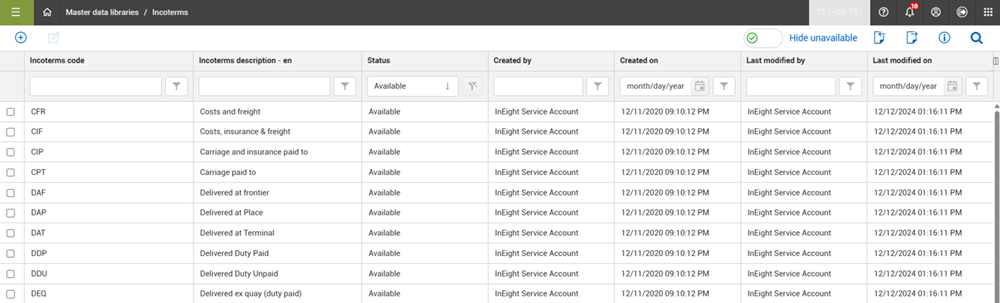
Within InEight Platform, you can store a list of incoterms used by your organization on the Incoterms master data page.
| Field |
Description |
| Incoterms code |
The unique identifier for the incoterm. |
| Incoterms description |
Brief description to further identify the incoterm. |
| Status |
Set the status to Available to allow the incoterm to be used. If the status is set to Unavailable and the Hide unavailable toggle is set to On, the incoterm does not show in the list. |
Manage Incoterms
You can add and edit incoterms by clicking the Add and Edit icons. From the right toolbar, the Import and Export icons allow you to add and export your incoterms in bulk.
By default, the Hide unavailable toggle is set to On, which filters the list to show only the available incoterms that can be assigned. Incoterm records cannot be deleted but the status of an incoterm record can be set to Unavailable, which prevents the incoterm from being used and assigned. However, if an incoterm is already indicated on a contract within a project, then it will still be available in that contract but will not be available for future contracts.
Use Incoterms
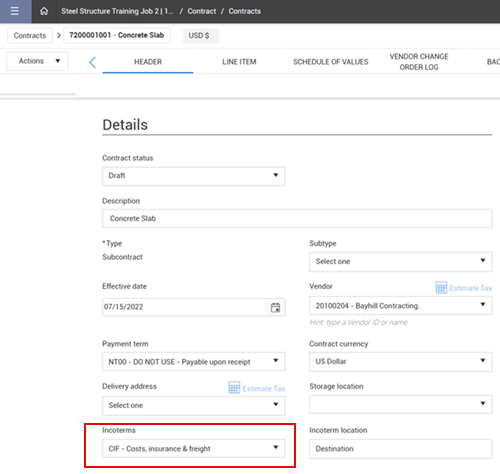
Within the InEight Contract application, on the Header details of a contract, you can select the incoterm for the contract from a drop-down list.
The values shown in this list are the incoterms on the master data page that have a status of Available.