Payment terms
Payment terms master data is used by the InEight Contract application.
Payment terms are the conditions set between subcontractor and owner or contractor for how and when payment for goods or services will be made, such as net 30 and pay when paid.
Considerations
With the applicable permissions, you can select the icon to add, edit, or delete master data payment terms. Permissions are configured in Roles and permissions > Master data libraries > Payment terms.
| Permission Name |
Description |
Level |
| View payment terms |
Allows the user to view payment terms master data. |
Base user |
| Add payment terms |
Allows the user to create and add payment terms to master data. |
Account Admin |
| Edit payment terms |
Allows the user to modify existing payment terms in master data.
|
Account Admin |
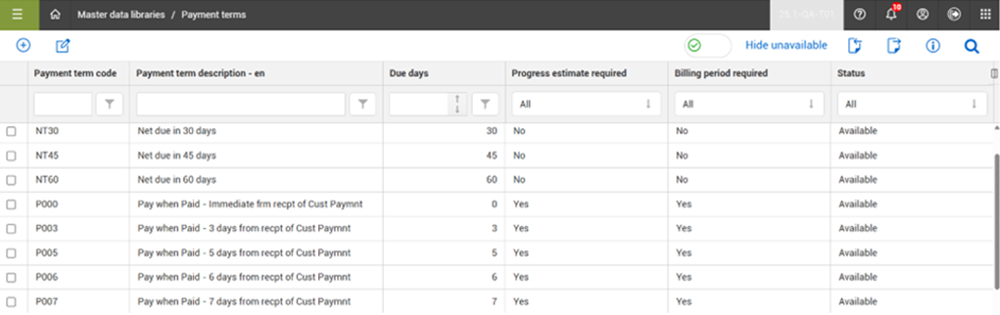
Within InEight Platform, you can store a list of payment terms used by your organization on the Payment terms master data page.
| Field |
Description |
| Payment terms code |
The unique identifier for the the payment term, which can include letters and numbers. |
| Payment terms description |
Brief description to further identify the payment term. |
| Due days |
Number-only field that indicates the number of days before payment is due. |
| Progress estimate required |
Setting that indicates if a progress estimate is required as part of the payment terms. |
| Billing period required |
Setting that indicates if a billing period is required. |
| Status |
Set the status to Available to allow the payment term to be used. If the status is set to Unavailable and the Hide unavailable toggle is set to On, the payment term does not show in the list. |
Manage payment terms
You can add and edit payment terms by clicking the Add and Edit icons. From the right toolbar, the Import and Export icons allow you to add and export your payment terms in bulk.
By default, the Hide unavailable toggle is set to On, which filters the list to show only the available payment terms that can be assigned. Payment term records cannot be deleted but the status of a payment term record can be set to Unavailable, which prevents the payment term from being used and assigned. However, if a payment term is already indicated on a contract within a project, then it will still be available in that contract but will not be available for future contracts.
Use payment terms
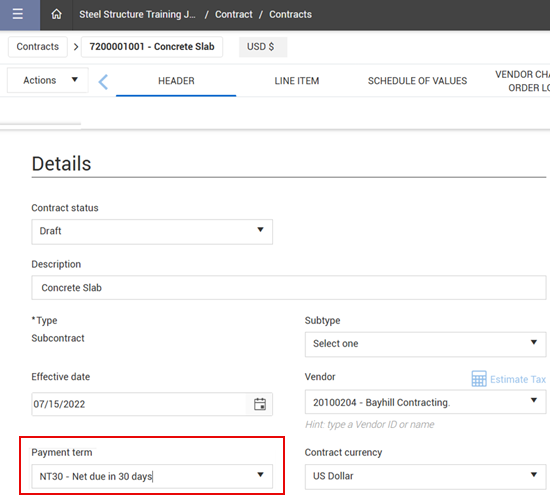
Within the InEight Contract application, on the Header details of a contract, you can select the payment term for the contract from a drop-down list.
If the contract vendor has a default payment term associated with it in the master data library, then the vendor’s default payment term is populated.
The values shown in this list are the payment terms on the master data page that have a status of Available.
If integrated with your ERP system, the assigned payment term will push to your ERP along with the other pertinent details of the contract.