Qualifications
Qualifications master data is not used by any InEight applications.
Qualifications are used to assign inspection tasks to employees or equipment. For example, a person with a forklift qualification must be able to inspect it. Qualifications are assigned in your ERP system, but you can view them in Master Data > Qualifications.
Considerations
With the applicable permissions, you can select the icon to add, edit, and delete master data qualifications. Permissions are configured in Roles and permissions > Master data libraries > Qualifications.
| Permission Name |
Description |
Level |
|
View qualifications
|
Allows the user to view the qualifications list. |
Base user
|
| Add qualifications |
Allows the user to add new qualifications. |
Organization Admin |
| Edit qualifications |
Allows the user to edit qualifications. |
Organization Admin |
| Delete qualifications |
Allows the user to delete qualifications. |
Organization Admin |
View qualification
-
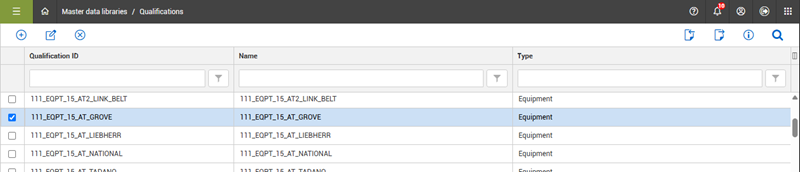
From the Main menu, select Master Data Libraries > Qualifications. The Qualifications page opens and shows the qualifications, name and type of qualifications. The qualification type is defined as either equipment or safety.
-
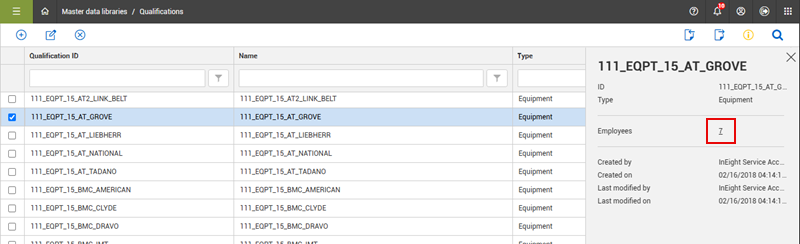
Select a qualification from the list, and then click the Information icon. The information slide-out panel opens and shows a number with a link to employees assigned the selected qualification.
-
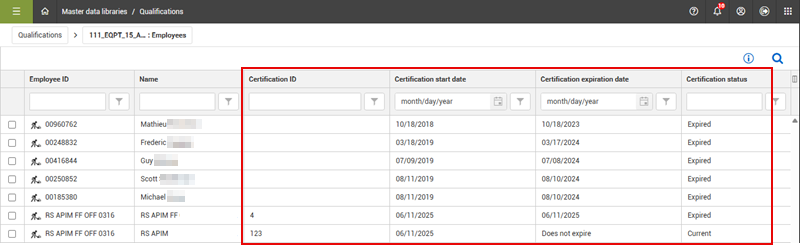
Click the number to view the list and certification information.