Operational rate codes
Operational rate codes allow you to define alternative pay rates that an employee is paid due to a contract that is specific to the project or could also be applied to an additional role the employee has on the job. Operational rate codes are typically used for prevailing wage type projects, where the employee rate code and craft rate code, might change based on the work being performed. Rate codes are configured in a project as needed and when available, can be assigned to operational resources in the project.
Considerations
Permissions for payroll indicators are configured in Roles and permissions > Organization and project > Projects.
| Permission name |
Description
|
Level |
|
View project rate codes
|
Allows the user to view the list of available rate codes in the project.
|
Project Admin |
|
Add project rate code
|
Allows the user to create and add rate codes in the project.
|
Project Admin |
|
Override project rate codes rates
|
Allows the user to change the state of the Override rates check box in Assigned operational resources and apply a different rate to employees and equipment.
|
Project Admin |
| Delete project rate codes |
Not used. This permission will be deleted in a future release. |
|
| Edit project employee rate code |
Allows the user to modify existing rate codes and the rate code assignment of an employee. |
|
Employee rate codes
The Employee page shows a list of project and craft rate codes that can be selected and assigned to employees on the project.
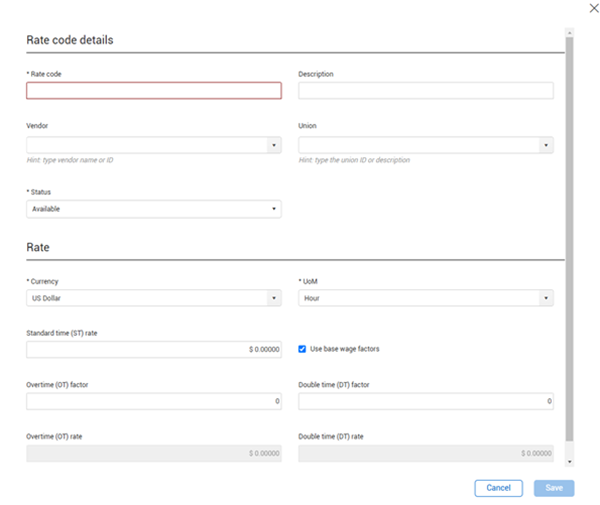
With the applicable permissions, the Add icon and Edit icon are available for you to create new and modify existing rate codes. When adding a rate code, the Rate code field must be a unique identifier.
Set the Status field to Available to allow the rate code to be assigned to a project resource. If the status is set to Unavailable and the Hide unavailable toggle is On, the rate code does not show in the list.
If the Use base wage factors check box is selected, the Overtime rate and Double time rate fields are calculated based on the overtime and double time factors entered.
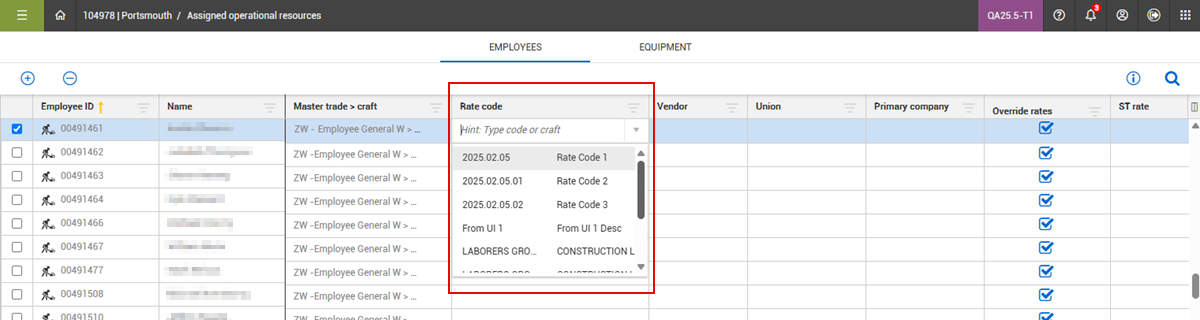
After rate codes are created and are set to Available, then they are shown in a drop-down list on the Assigned operational resources page.
Equipment
Equipment rate codes are used for equipment that is assigned to a prevailing wage type project, the same as operational rate codes are used for employees. When available, the rate codes can then be applied on the Assigned operational resources > Equipment page for the project.