Office Integration
Welcome to the InEight Document Office Integration module. Here you’ll find information about integrations with Office 365 (Online) and Office desktop applications.
Office 365 (Online) Integration
See the information and video below for using the Office 365 Integration.
-
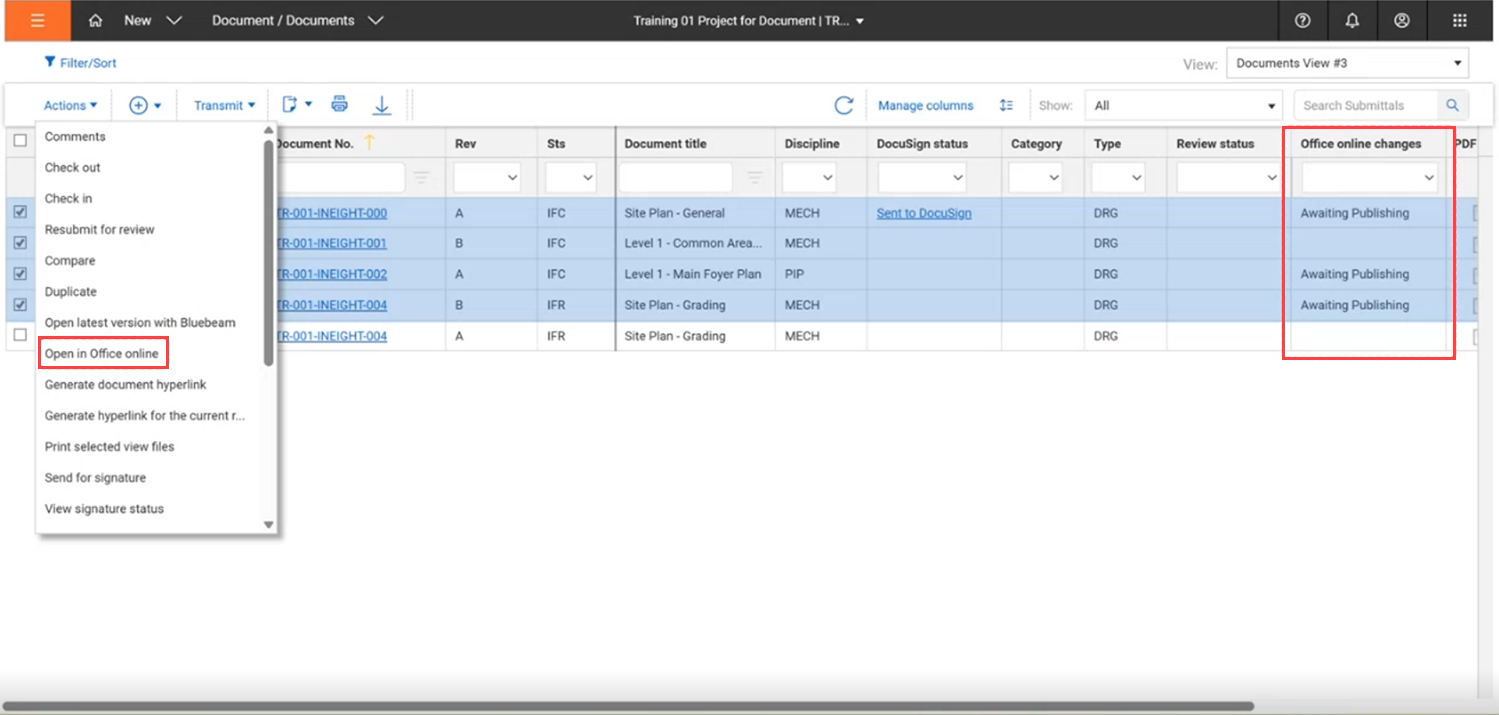
Microsoft Office 365 editing – When Document is integrated with Office, you can now open a document for editing in Office 365, so you can take advantage of Office’s collaborative editing capabilities. Previously, you could only edit a document in Office on the desktop.  Read more
The option Open Office online has been added to the Actions menu on the Documents register. When you select this option, the selected document opens in Office 365.
After you make changes to the document you can publish them in Document. A new column Office online changes has been added to the Documents register. After you make changes to the document, the value of the column is Awaiting Publishing.
When editing is complete, you can go to the Details page of the document to publish it. The Files section of the Details page shows a warning that changes have been made to the file and who made the most recent changes. You can then publish the document as a new revision or as a new version.
The Publish changes button has been added to the Details page. To publish changes, click Publish changes, and then select Publish as a new Revision or Publish as a new Version.
- Activate Microsoft Office Review
- Review a document in Microsoft 365
- Edit document online with Office 365
Office Integration for Desktop
See the links below for information on using the Microsoft Office Integration for Desktop.