Module permissions
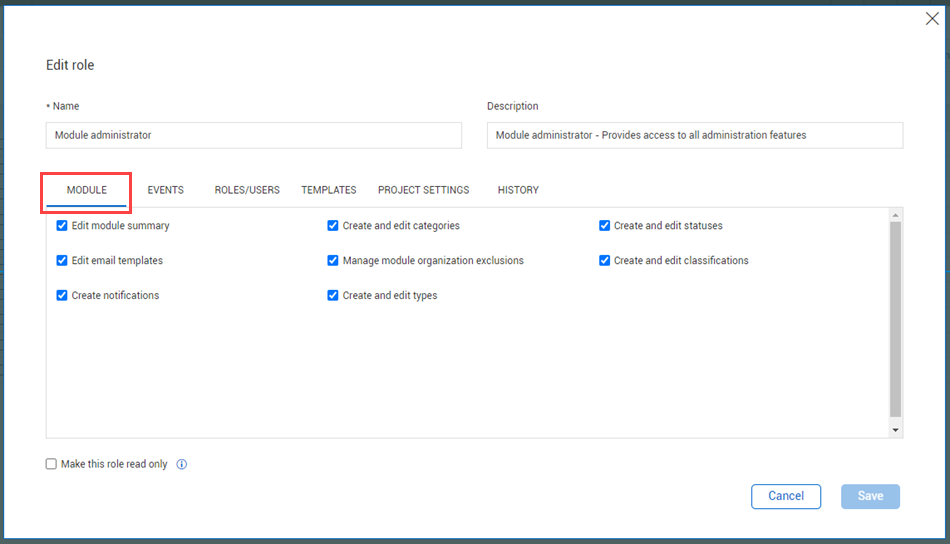
Within Compliance or Completions individual modules, you can configure permissions for the module. To go to Module permissions, go to Module settings > Roles. Select Add role or click an existing role to edit the role, and then select the Module tab.
The following table is a summary of permissions in the Module tab:
| Permission |
Location |
Allowed actions
|
| Edit module summary
|
Module settings > Module summary tab. |
|
| |
Compliance/Completions landing page. |
|
| |
Module landing page. |
|
| Edit email templates |
Module settings > Email templates tab. |
|
| |
Template manager > Form builder or Task builder. |
|
| Create notifications
|
Events and tasks lists (Project level). |
|
| Create and edit categories
|
Module settings > Categories tab. |
|
| |
User assignments. |
|
| |
Template properties. |
|
| Manage module organization exclusions
|
Module settings > Module summary > Configurations > Module organization. |
|
| Create and edit types
|
Module settings > Types tab. |
|
| |
Template manager > Create new form. |
|
| |
Template manager > Form builder > Properties tab. |
|
| Create and edit statuses
|
Module settings > Statuses tab. |
|
| |
Form or task. |
Edit statuses when performing an event. |
| Create and edit classifications |
Module settings > Classifications tab. |
Add classifications.
Delete Classifications. |
| |
Template manager > Form builder or Task builder. |
Select classifications in template headers under the Logic drop-down. |
Considerations
-
You must have Level 3 – Account Admin permissions in InEight Platform or a Compliance or Completions role with the applicable permissions.
-
The Make this role read-only option is available in all tabs, except for the History tab. For more information, see Read-only role.
Steps
To navigate to Module permissions, see steps to access organization level settings in Settings overview.