Bid package type configuration
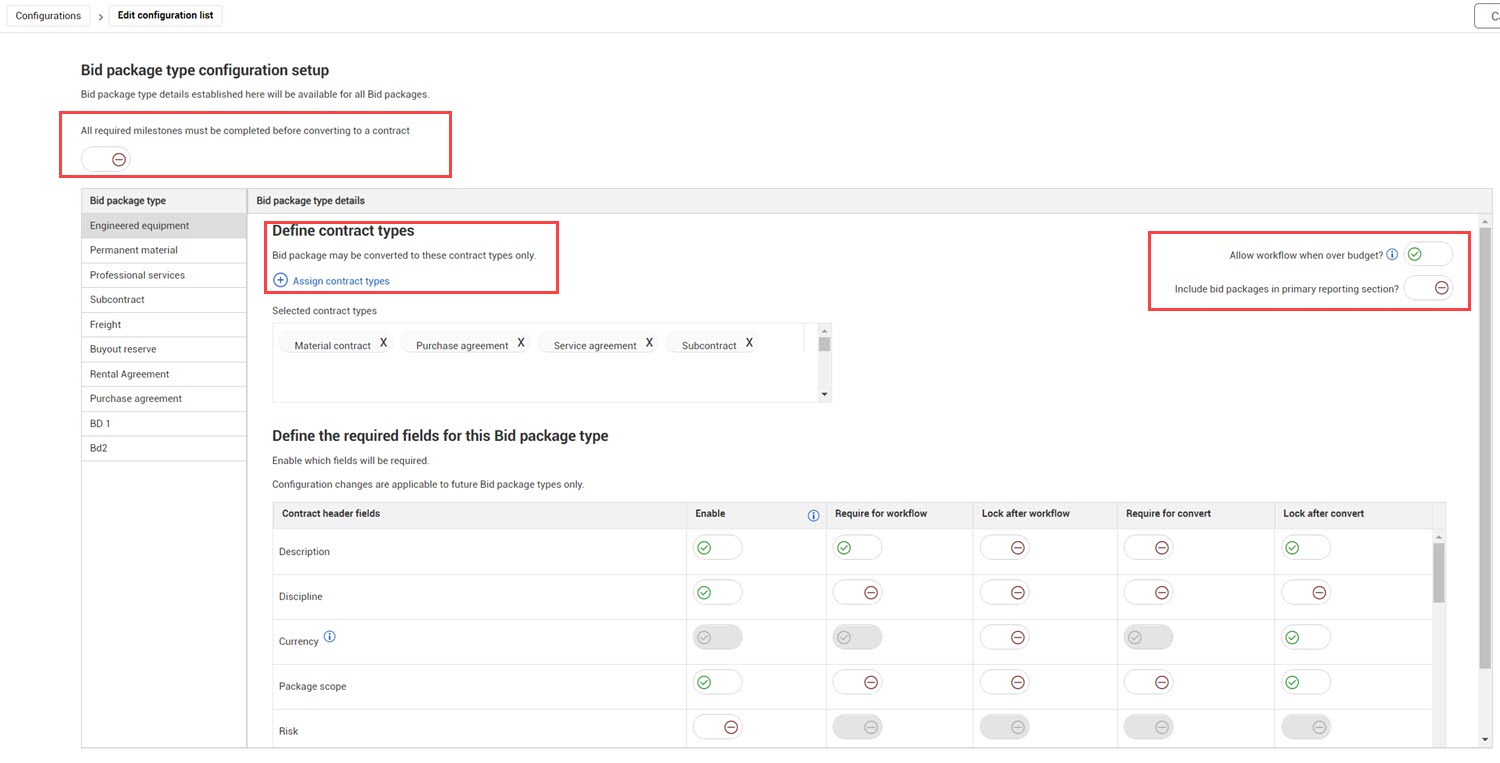
The Bid package type configuration setup lets you establish details by bid package type. You can also indicate whether all milestones must be completed before converting to a contract.
Milestone completion
When the All required milestones must be completed before converting to a contract toggle is set to Yes, a bid package must complete all milestones before you can convert it to a contract. When set to No, you can convert the bid package at any time. This setting applies to all bid package types.
Allow workflow when over budget
The Allow workflow when over budget toggle lets you control whether workflow can be initiated for a bid package type based on budget. When the toggle is set to No and the original base value of the bid package exceeds the WBS current budget, an error shows when you try to start the approval process. You should then check the original base value or reach out to the project controller. When the toggle is set to Yes and the original base value of the bid package exceeds the WBS current budget, a yellow warning banner shows at the top of the Budget check tab if there is a loss. You can still start the workflow if the bid package exceeds the current budget.
Include bid packages in primary reporting section
The Include bid packages in primary reporting section toggle lets you control the default for the Include this bid package in primary reporting section field (Bid package details > Additional Details > Reporting). The field value can be changed in the Bid package details.
Show Primary Reporting Bid Packages Only is a parameter in some reports, such as Buyout Review. When this parameter is selected, only bid packages with the Include this bid package in primary reporting toggle in the bid package details set to Yes are shown in the report.
Define contract types
You can specify which contract types a bid package type is associated to. Click Assign contract types to see a list of available contract types. Select the required contract types, and then click Add. You can also click the X by the contract type in the Selected contract types field to delete a contract type.
Required fields
You can enable or disable fields and specify if enabled fields are required or locked for workflow or conversion to a contract.
For each bid package field, you can specify if it is enabled. If a field is enabled you can specify whether it is required or locked. The settings for workflow and conversion work independently. When a field is required for workflow or conversion, a value must be entered before you can start the approval workflow or convert a bid package to a contract. Locking a field prevents users from changing values after the workflow approval or conversion has been started.
The default for Enable settings is set to Yes for all fields, but you can disable any field except the Currency field. When a field is disabled, it shows on the Bid package header tab, but it is dimmed, and you cannot enter a value.
The Currency field is required for workflow and converting the bid package to a contract. This setting cannot be changed.