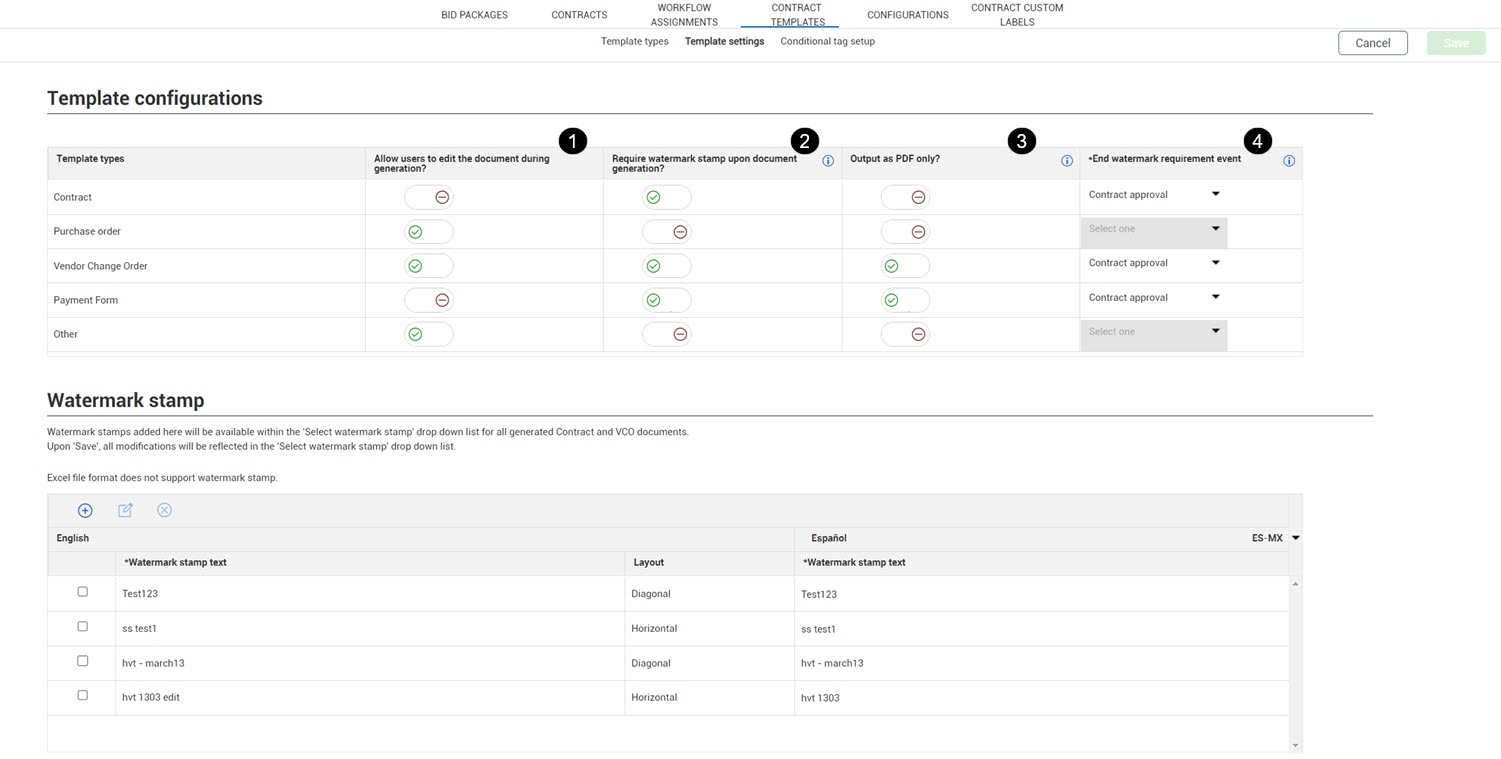
Template settings subtab
Template settings let you configure characteristics for each template type at the organization level. The Template settings subtab (Settings > Contract templates > Template settings) contains controls for editing, watermark stamps, and PDF output.
|
Item number
|
Name
|
Definition
|
|
1
|
Allow users to edit the document during generation |
Indicates whether users can edit a contract document of this type when it is in the review stage. When set to Yes, a user can edit the contract document from the Review templates dialog box. When set to No, the contract document cannot be edited from the dialog box, and the user has to edit contract information in Contract. |
|
2
|
Require a watermark stamp upon document generation |
Indicates whether to apply a watermark stamp when a document of this type is generated. When set toYes the watermark is applied to the document, but is removed after the document has been approved. You can configure the watermark text and settings in the Watermark stamp section of this page. When set to No, the contract document does not have a watermark. |
|
3
|
Output as PDF only |
Indicates whether you can only generate a PDF when you create a contract document of this type. When set to Yes, you cannot generate a Microsoft Word or Excel document or make changes to the contract files individually. |
| 4 |
End watermark requirement event |
Indicates the contract approval event that must occur before the watermark stamp is no longer required for this template type. For example, if you set the End watermark event field to Contract approval, the watermark is no longer required after the contract is approved. You can also indicate that the watermark stamp is always required regardless of the contract approval event. The watermark is removed from the generated document when the document is approved. This field is enabled only when the Require watermark stamp upon document generation toggle is set to Yes. |
The Watermark stamp section lets you define watermark text and layout for the Select watermark stamp drop down list in the Contract writer. You can define the text for all languages used in your templates. The language of the watermark matches the language of the template.