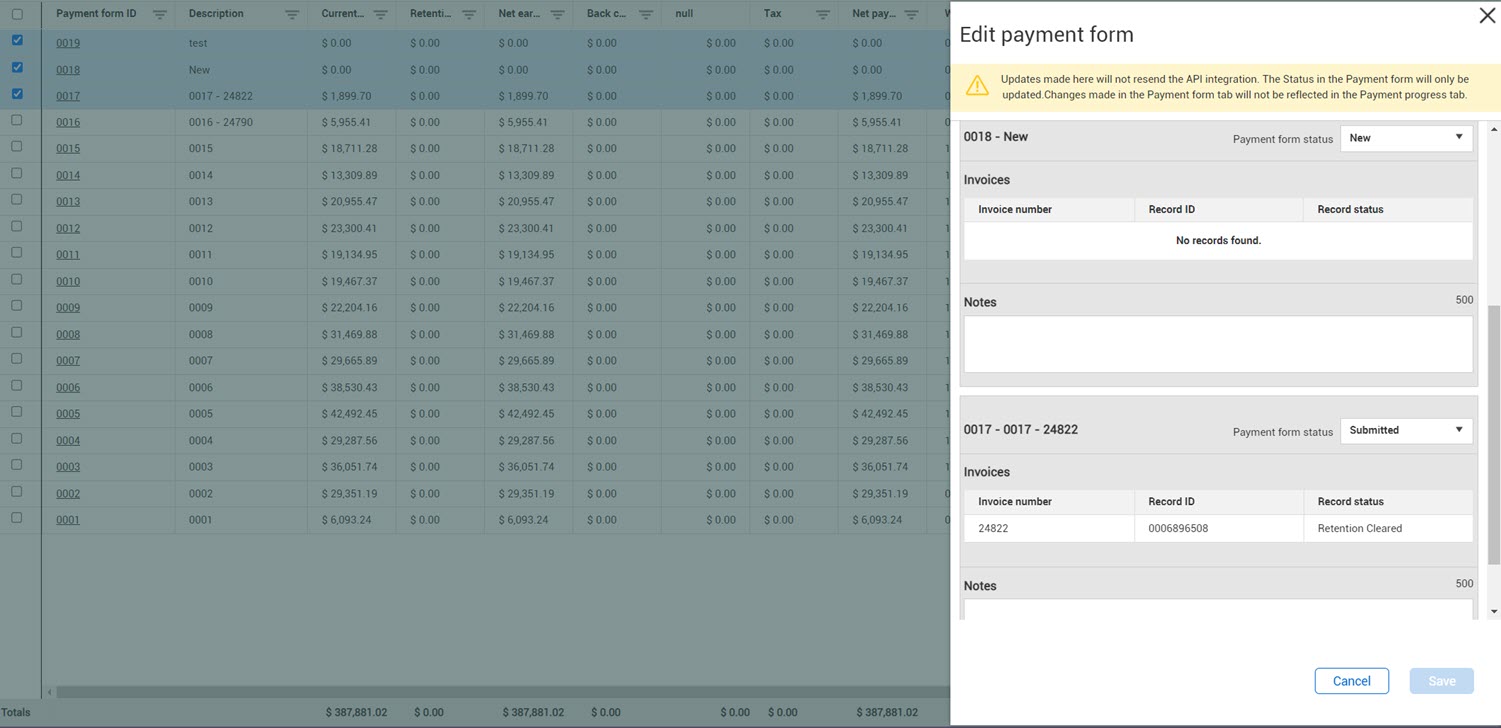
Edit payment forms from the Payment forms register
Users with the Edit payment progress permission can edit payment forms from the Payment forms register.
Step by Step — Edit payment forms from the register
Edit one or more payment forms when you must make changes to the payment to keep Contract in sync with an ERP system.
You can make changes to the Payment form status, Record ID, Record status, and Notes fields only. Changes made on the Payment forms tab affect the Payment forms tab only. They do not affect the Payment progress tab. When you edit the Payment form tab, no APIs are triggered, so duplicate items are not created and submitted to the ERP system.
-
Select up to 10 forms, and then click the Edit icon. The Edit payment form slide-put panel opens.
-
Make changes to the Payment form status, Record ID, Record status, and Notes fields for each payment form.
-
Click Save.
The changes are recorded on the Administrative notes tab of the Notes slide-out panel.