Products
Solutions
Resources
9977 N 90th Street, Suite 250 Scottsdale, AZ 85258 | 1-800-637-7496
© 2024 InEight, Inc. All Rights Reserved | Privacy Statement | Terms of Service | Cookie Policy | Do not sell/share my information

You can move columns by selecting a column header and using drag-and-drop. If there are columns on the register that you don’t use, you can hide and unhide them from view, as needed.
In the CBS, click on the Currency column header and drag the column to the left, dropping it to the right of the Description column.
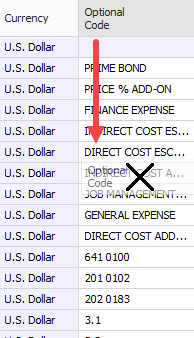
Hide the Optional Code column by dragging the Optional Code column header down until a black X appears, then let go.
The Optional Code is now hidden from view
To unhide a column, right click on any column header and select Column Chooser; a Customization window appears, which contains all the hidden columns in that register
Find the column you want to unhide and drag-and-drop it to the location where you want it to go.
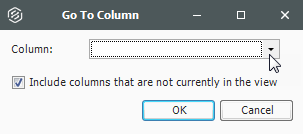
You can also unhide a column using the Go To Column feature
Right click on a column header and select Go To Column.
Click on the drop-down menu and select the column you want to unhide.
Click OK.
Additional Information
9977 N 90th Street, Suite 250 Scottsdale, AZ 85258 | 1-800-637-7496
© 2024 InEight, Inc. All Rights Reserved | Privacy Statement | Terms of Service | Cookie Policy | Do not sell/share my information