Library Resource Rate Register
To open the Library Resources Register, click the Resources icon in the Master Resources ribbon. Alternatively, you can click the Labor, Equipment, or Materials icons to navigate directly to those tabs in the register.
|
Name
|
Description
|
|
1
|
Tabs
|
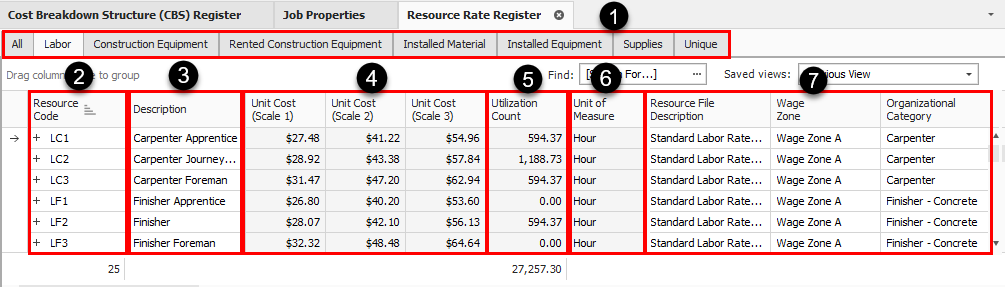
There are tabs along the top of the form for each of the seven resource types, in addition to an All tab that holds the resources of all types.
|
|
2
|
Resource Code
|
Each record (or row in the register) represents a single resource.
|
|
3
|
Description
|
The Description provides more detail about the resource.
|
|
4
|
Resource Rate per Unit
|
This is the resource cost per unit.
|
|
5
|
Utilization Count
|
Tells you how many units of that resource are being used in the job.
|
|
6
|
Unit of Measure
|
Each resource is defined with a Unit of Measure.
|
|
7
|
Register
|
This register includes columns for the resource attribute categories so you can filter and group your resources.
|
Source Job and Source System name fields
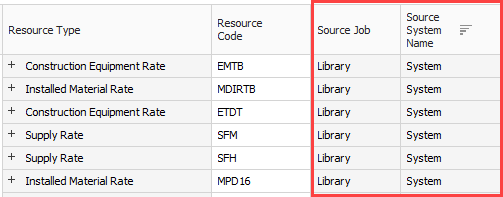
The Source Job field provides visibility into the jobs from which the data may have originated from.
The Source System Name helps to see the source of the data when integrating with other systems.
You cannot add new resources on the All tab. You can search for resources in the Resource Rate Register using the Find field.