DOT Import
You can manage electronic bid proposals in the Estimate’s Pay Item and Proposal register using electronic DOT bid files. You can import line items in bulk directly into your estimate.
Depending on the DOT and bidding system, file formats can include EBS/EBSX and other electronic formats.
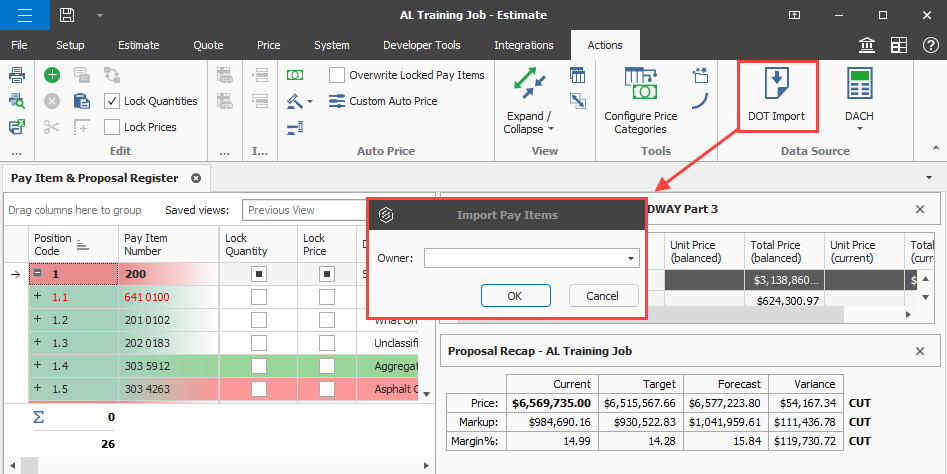
In the Actions > Data Source section of the Pay Item & Proposal register, click DOT Import to open the Import Pay Items dialog box.
Import a DOT bid file
-
In Pay Item & Proposal Register > Action tab, click DOT Import.
-
In the Import Pay Items dialog box, click the Owner drop-down to view the list of available electronic DOT file sources.
-
Select a source, and then click OK.
-
Locate your electronic source file, and then click Open.
-
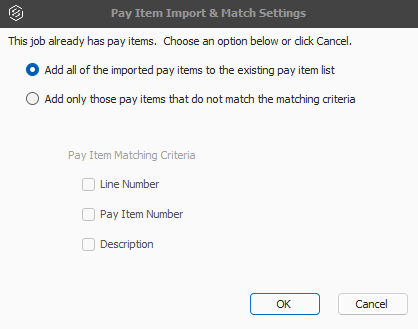
If your job has existing pay items, the Pay Item Import & Match Settings dialog box opens. You can select to import all pay items or add only pay items with certain criteria. Select your option, and then click OK.
You must have all the UoMs from the imported file entered in the job’s foundation setup data. An Attention dialog box shows when Estimate adds UoMs not found in the job's foundation setup data. You must review the added UoMs and modify as needed.
You can review and update the imported pay items as needed. Cost items are automatically created when Lock Cost Items to Pay Items is selected.