Cost categories tab
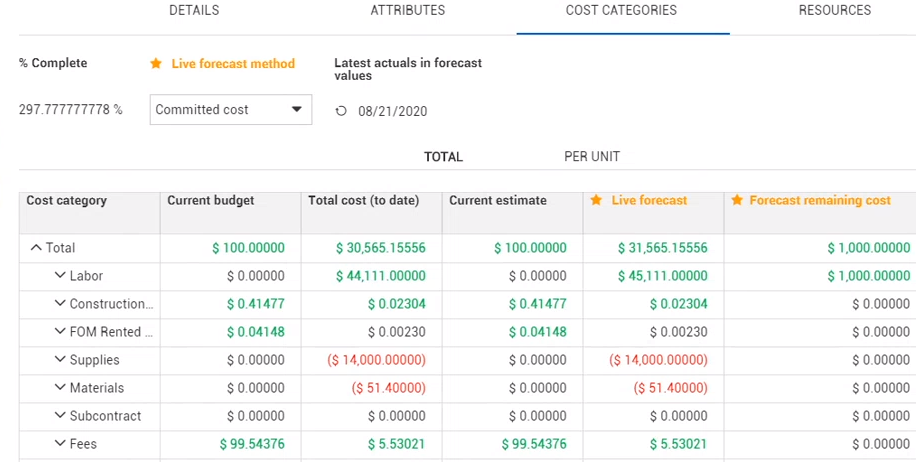
The Cost Categories tab allows you to view your current budget, actuals, live forecast and forecast remaining cost, broken down into more detailed cost categories (e.g., labor, construction equipment, supplies, materials, etc.).
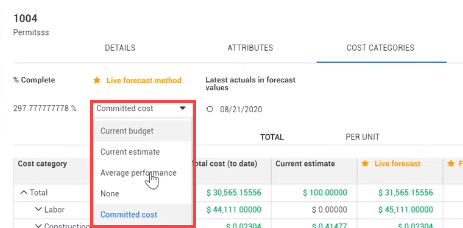
The header in the Cost Categories tab shows the % Complete, Live forecast method, and the Latest actuals in forecast values.
If you have the correct permissions, you can change the Live forecast method. You can also change the view of the Cost Categories values to show either Total or Per Unit cost.
This is also where you enter the estimated cost into the different cost categories for the plug cost source.
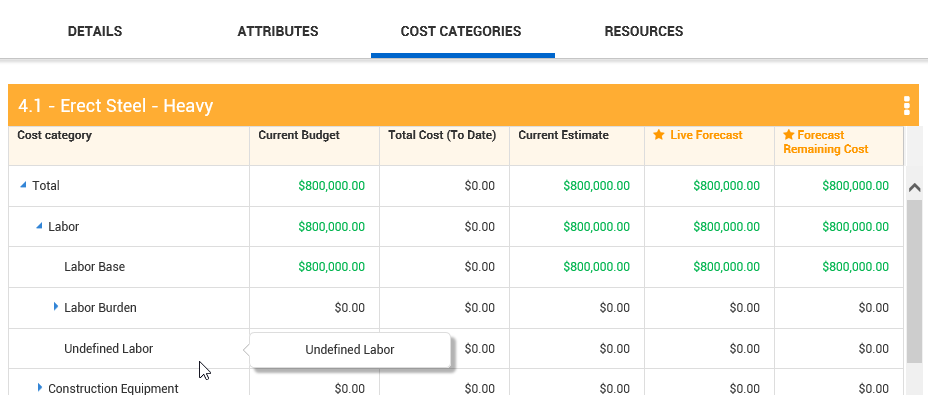
You can expand the labor category and enter your cost at the appropriate level (e.g., Labor Base wages). You need to enter the cost under the appropriate level of the category. For example, if you enter the cost at the Labor category level, the cost will appear in Undefined Labor level because you did not enter it at a specific sub-category level.
The following Step by Step walks you through adding costs to the Cost Categories tab of the Cost item details slide out panel.
Enter Costs in Cost Categories
-
Within the InEight Control main page, on the CBS tab, right click on the cost item you created.
-
Select Cost Item Details to open the Cost item details slide out panel.
-
Click on the Cost Categories sub tab.
-
Under the Current Estimate column, expand the Labor cost category.
-
In the Current Estimate column, enter a value in the Current Estimate column for Labor Base, then press the Tab key.