|
1
|
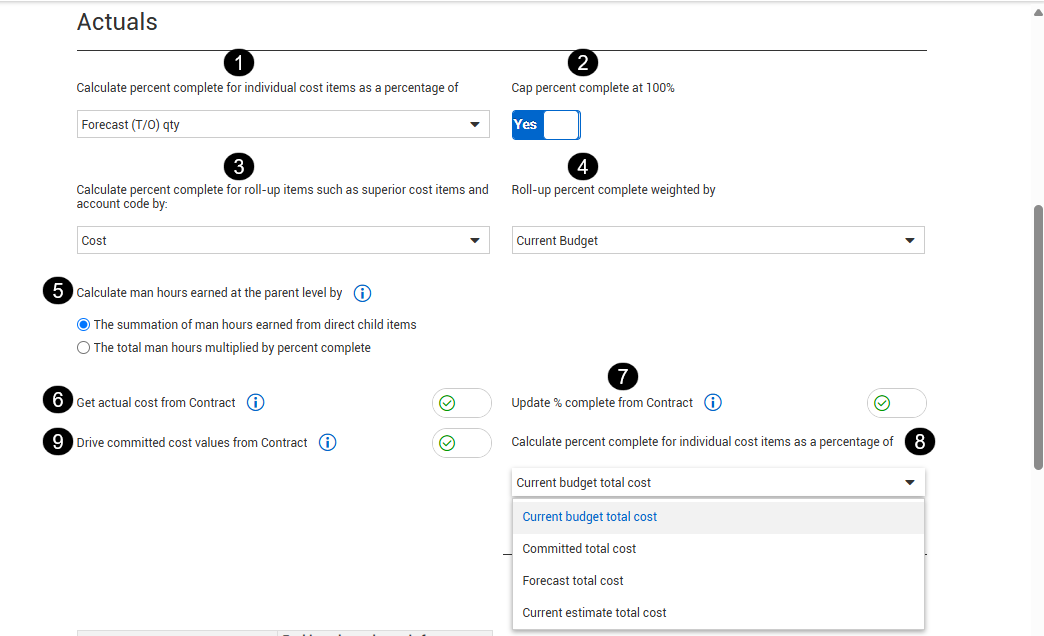
Calculate percent complete for individual cost items as a percentage of
|
Calculate percent complete for individual cost items as a percentage of:
-
Forecast (T/O) Quantity
-
Current Budget Quantity
|
Organizational and project |
|
2
|
Cap percent complete at 100%
|
Option to select to cap any cost item percent complete at 100%.
|
Organizational and project |
|
3
|
Calculate percent complete for roll-up items such as superior cost items and account code by
|
Controls whether earned cost or hours are used when calculating percent complete for roll up items. The roll up result can differ depending on whether progress is measured by cost or by man hours.
This setting does not change the subordinate item percent complete. It only changes the basis used when rolling those subordinate values up to a superior item or account code.
The calculation is:
Roll up % Complete = Earned cost or man hours from Current Budget or Current Estimate ÷ Total cost or man hours from Current Budget or Current Estimate
|
Organizational and project |
|
4
|
Roll-up percent complete weighted by
|
Controls whether Current Budget or Current Estimate is used as the weighting basis when combining subordinate items into a roll up percent complete.
Control applies a weighted average, so larger items have a greater influence on the superior result.
The calculation is:
Roll up % Complete = Earned cost or man hours from Current Budget or Current Estimate ÷ Total cost or man hours from Current Budget or Current Estimate
|
Organizational and project |
|
5
|
Calculate man hours earned at the superior level by
|
Calculate man-hours earned for roll-up items by summing the man-hours earned of the contributing items (regardless of roll-up items percent complete) by:
|
Organizational and project |
|
6
|
Get actual cost from Contract
|
When switched to On, the subcontract actual cost is received from Contracts. Actual costs from Contract can consist of a goods receipt, an accrual, or an invoice receipt/payment form. If a goods receipt and an invoice receipt come in at the same time for a record, the higher cost is recognized and not duplicated.
|
Project level only |
|
7
|
Update % complete from Contract
|
When switched to On, quantities that are claimed in Contract for SOV items updates the percent complete in Control. You must enable this setting before the contract is created.
Updating the percent complete provides you with another way to claim quantities against schedule of value items in Contract.
When quantities are claimed against a schedule of values item in Contract and the Get quantities sync is executed in Control, the cost items actuals quantity completed gets updated with a percentage claimed toward the contract's schedule value total cost.
|
Project level only |
|
8
|
Calculate percent complete for individual cost items as a percentage of
|
Calculate the percent complete for individual cost items as a percentage of:
|
Project level only |
|
9
|
Drive committed cost values from Contract
|
When switched to On, the committed costs are driven from Contracts. When switched to Off, committed costs are derived from the ERP.
|
Organizational and project |